Job management software for landscapers.

Quoting, scheduling, invoicing and payments — Kelpie runs your whole landscaping business from one app. Quote the makeover on site, run your maintenance rounds and big builds side by side, and it all syncs to Xero.
No card needed 14 days free
app.kelpiehq.com/jobs/today
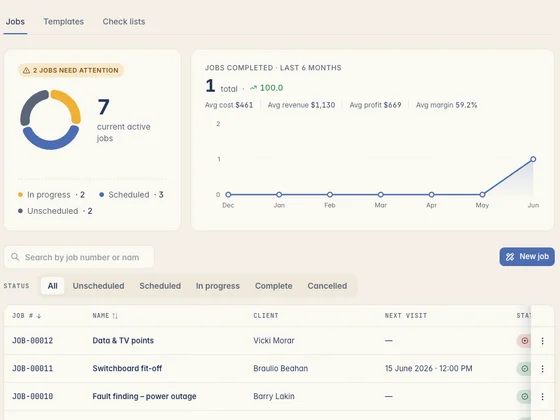
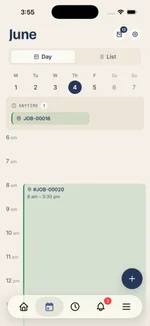
The Kelpie jobs screen — jobs needing attention, active jobs and the full job list
Mowing round
15 lawns · booked for the week
INV-2208 paid $7,200
Tap-to-pay · same week
What the crew reckons

Tradies who made the switch.

Real tradies, real businesses — running the whole job out of Kelpie.

What's slowing landscapers down

You build great gardens. The admin's the weed.

The build's the easy part. It's running two businesses at once, the under-priced materials and the winter cash flow that eat your evenings.

01 Two businesses in one shoebox

Big design-and-construct jobs and weekly maintenance rounds, run from the same diary, the same shoebox of receipts and the same flat-out phone. Something always slips.

02 Quotes that under-price the materials

Soil, pavers, turf, plants and plant hire all move in price. Under-quote the materials on a fixed-price makeover and the job bleeds — and you don't see it until the receipts are in.

03 Cash flow that dries up in winter

The maintenance work dips when the weather turns, but the bills, the wages and the loan on the bobcat don't. The money runs as seasonal as the work.

A landscaper's week, ran on Kelpie

From the quote on site to a garden that pays every month.

A design-and-construct build and a weekly maintenance round, running side by side — it all runs from the one app.

1 On site · Quote the makeover

Price the build with materials and labour.

Walk the yard, measure up, and quote the turf, paving, retaining wall and planting from your price book — materials, plant hire and labour all in. Send it on the spot, and the customer can accept it from their phone before you've left the driveway.
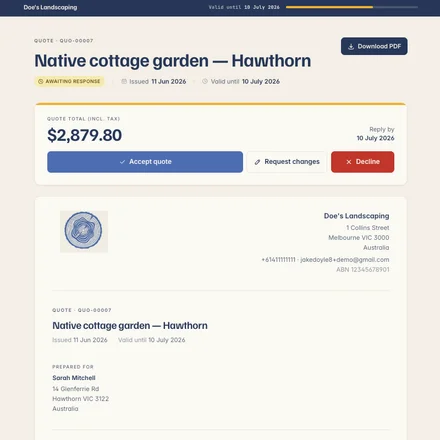
  • Materials, plant hire and labour — itemised from your price book, so the makeover isn't under-priced.
  • Sent on the spot — a tidy quote from your phone before you've left the driveway.
  • Accepted from their phone — they accept the quote and the job's booked in.
A Kelpie quote on the customer's screen — accept, request changes or decline in one tap
2 The round + the build

Keep the rounds running while the build goes on.

Your weekly mowing and garden rounds sit on the calendar for the crew to tick off — duplicate last week's round in a tap rather than rebuilding it — while the design-and-construct build runs on its own schedule, reshuffled around the rain. Timesheets and materials log against each job as you go.
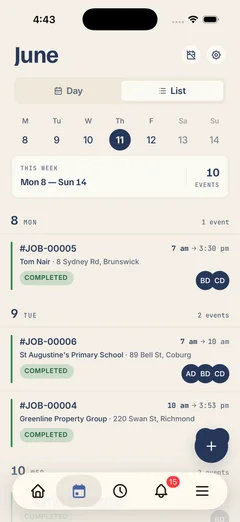
  • Rounds without the rebuild — duplicate last week's mowing and garden round in a tap, not from scratch.
  • Reschedule around the weather — bump the turf day without losing the job.
  • Costs against the job — timesheets and materials logged, so you see the real margin.
Kelpie's schedule on a phone — the week's jobs in list view, each with its crew, time and address
3 Job done · Paid

Invoice the build, bill the round, get paid.

Mark the build done and the accepted quote becomes a ready-to-send invoice — materials and labour already on it, GST and your ABN too. Take tap-to-pay or send a payment link, and invoice each maintenance visit as you go. It all syncs to Xero.

  • Invoiced from the quote — the build's invoice is the accepted quote plus any extras, no re-keying.
  • Tap-to-pay or a payment link — card or bank transfer, money in days not weeks.
  • Syncs to Xero — GST and your ABN carried across, nothing typed twice.
A paid Kelpie invoice on a phone — payments logged against the balance, ready to sync to Xero
Built for the way landscapers work

Everything a landscaping business runs on.

Six tools that used to mean a pile of paperwork and a Sunday night — now they're one tap apart.
The Kelpie quote editor — line items with cost, markup, GST and live totals
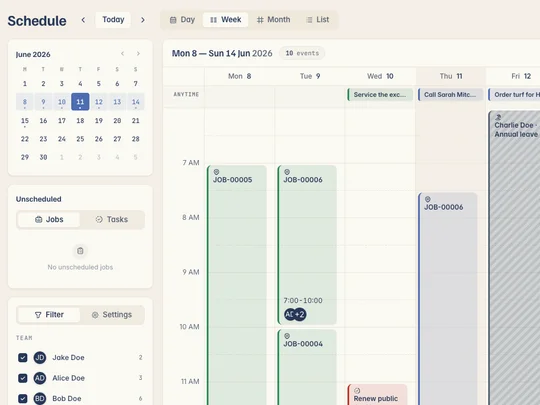
Kelpie's week schedule — recurring service jobs laid out across the calendar, duplicated from last time rather than rebuilt
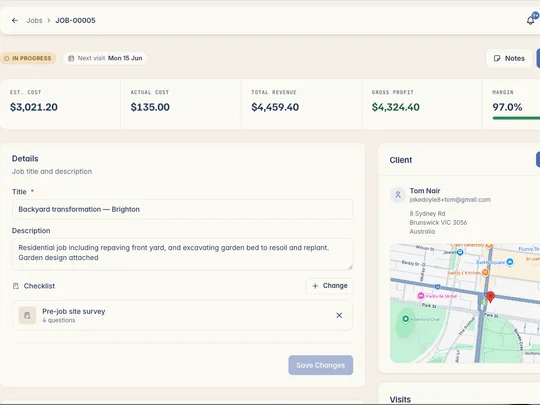
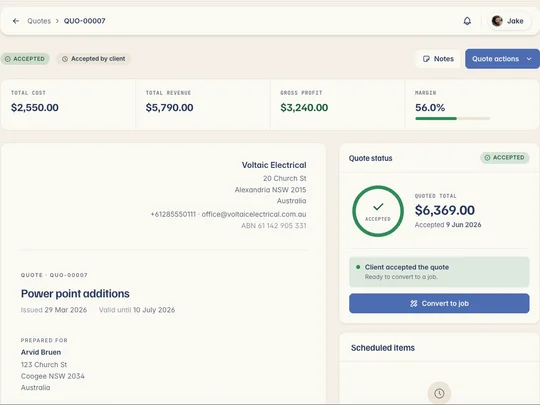
A Kelpie job card — actual cost, revenue, gross profit and margin tracked against the job as it runs
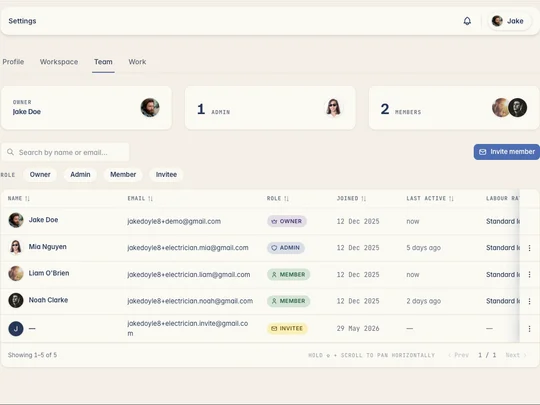
Kelpie's team roster — the whole crew with roles and last activity
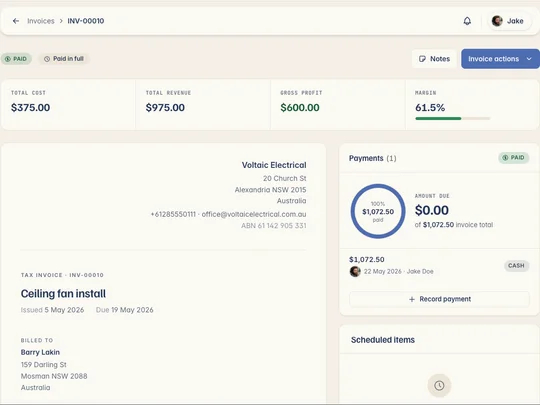
A Kelpie invoice — itemised with GST and your ABN, ready to sync straight through to Xero

Quote builds with materials, plant hire and labour from your price book — accepted on the spot.

Learn more about On-site quoting

Run the same round each week? Duplicate it in a tap, rebuilt from last time, not from scratch.

Learn more about Rounds without the rebuild

Log materials, plant hire and timesheets against each job — see the real margin on every build.

Learn more about Costs and margin per job

Everyone gets their own login and sees only the jobs that matter — you pay for the seats you fill.

Learn more about Crew & subbies

Every invoice carries its GST and ABN, then syncs straight to Xero — so BAS isn't a lost weekend.

Learn more about Syncs to Xero
Kelpie vs Jobber

Every feature, every job — one simple plan.

Other apps cap how many customers you can hold and keep their best features for pricier plans. Kelpie gives you every feature, every job and every round, for one simple price per user.

How they stack up
Everything included
Jobber Tiered plans, contact caps
Works on any phone — iPhone or Android
Often Apple-first
The full app on mobile
Cut-down on mobile
Every feature included
No per-job caps or limits
Often capped
One simple price per user
Tiered plans

Every feature's included on every seat — no tiers, no per-job caps, no add-ons.

Questions, answered

What landscapers ask before switching.

Yes — that's the point. Run your big design-and-construct jobs and your weekly maintenance rounds side by side in the one app. Duplicate a round in a tap rather than rebuilding it each week, run the builds on their own schedule, and bill both straight to Xero.
Yep. Build a quote from your price book with materials, plant hire and labour all itemised — sent from your phone before you've left the driveway, so the makeover isn't under-priced and the customer can accept on the spot.
Yes. Quote materials, plant hire and labour from your price book so nothing's left off, then log the real costs and timesheets against the job as you go — so you see the margin on every build and quote the next one sharper.
Yep — Kelpie's the same full app on your phone, tablet and laptop, iPhone or Android. Quote on site, run the build and the rounds, send the invoice and take payment — then pick it up on the laptop back home. Everyone gets the full app, not a stripped-back mobile version.
Yes. Kelpie runs your quoting, jobs, rounds and payments, then syncs every invoice to Xero — GST and your ABN carried across, so nothing's typed twice and your BAS stays organised for the next tax period.
Keep Xero — it's great at the books. But Xero doesn't quote a backyard makeover on site, run your mowing rounds, cost a build or take payment in the field. That's everything before the money hits your accounts — and it's exactly what Kelpie does. Then it syncs straight to Xero, so the numbers land without you typing them twice.
It is. ABN and GST are built into every invoice, itemised quotes, job costing and repeat rounds match how landscaping is actually run and paid, and it works with Australian accounting software and your accountant. It speaks tradie out of the box.
14 days free No card needed

Run your landscaping business from one login.

Start your 14-day free trial today — no card, no lock-in, completely risk-free. So what are you waiting for?

No card needed 14 days free Cancel anytime