Get the invoice out before you've left the driveway.

Turn a finished job into a branded, GST-correct invoice in one tap and send it from your phone on site. It syncs to Xero, so you're not typing the same numbers in twice.
No card needed 14 days free Syncs to Xero
app.kelpiehq.com/invoices/INV-3310
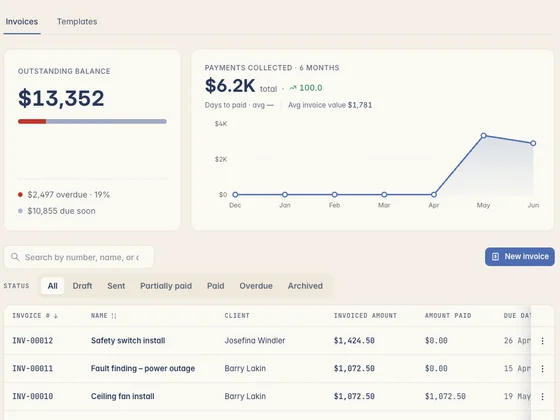
Kelpie's invoices screen — outstanding balance, payments collected and every invoice's status
Invoice sent
$4,180.00
GST $380 · synced to Xero
Paid online
3 days after sending
What the crew reckons

Tradies who made the switch.

Real tradies, real businesses — running the whole job out of Kelpie.

The invoicing you do at night

Late invoices mean late money.

The job's done but the paperwork isn't — and every day it waits is a day longer until you get paid. Here's what slow invoicing costs.

01 Invoicing on a Sunday night

The job finished Thursday, but the invoice waits till Sunday at the kitchen table — after a full week on the tools, when chasing money is the last thing you feel like.

02 Out late, paid late

An invoice that goes out a fortnight late gets paid a fortnight late. Meanwhile you've already forked out for the materials and the wages.

03 Typing it all into Xero twice

You wrote the quote, did the job, and now you're re-keying the same numbers into your accounting software. Same job, double the admin, and a spot for a typo to creep in.

How invoicing works in Kelpie

From finished job to invoice, on the spot.

Bill the job before you leave site — GST sorted, ABN on it, synced to your books.

1 Step 01 · One tap from the job

The job becomes the invoice.

The accepted quote and the work done pre-fill the invoice — labour, materials, the lot. No re-keying line items into a fresh document.
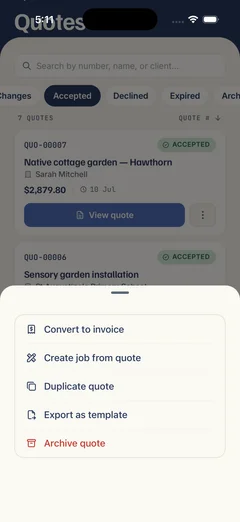
  • Quote to invoice in one tap — everything carries across, nothing retyped.
  • Sent from your phone on site — bill the job before you've packed up and driven off.
  • Your price book built in — add an extra item from your saved rates if the job grew.
An accepted Kelpie quote on a phone with its actions open — convert to invoice, create a job, duplicate or export, all in one tap
2 Step 02 · GST and ABN sorted

A proper tax invoice, every time.

GST broken out line by line, your ABN and branding on it, the tax-invoice wording correct — compliant the second you hit send, with no manual maths.
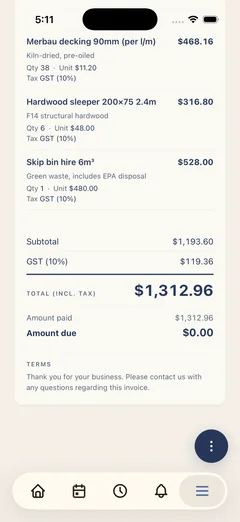
  • GST calculated automatically — shown clearly and labelled as a tax invoice.
  • Your ABN and branding — on every invoice, so it's compliant and looks the part.
  • Itemised line by line — labour and materials spelled out, so the customer sees exactly what they're paying for.
A Kelpie tax invoice on a phone — GST broken out line by line, with the subtotal, GST total and total including tax
3 Step 03 · Synced to Xero

Sent, and straight into your books.

Every invoice flows through to Xero or MYOB for reconciliation, so the number you billed is the number in your accounts — and Kelpie chases the late ones for you.
  • Syncs to Xero and MYOB — no double entry, and your invoice numbers line up.
  • Automatic reminders — overdue invoices get chased without you lifting a finger.
  • See when it's opened — know the customer's read it, so you know when to follow up.
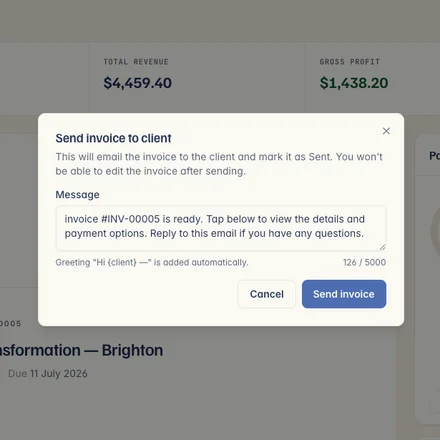
Sending a Kelpie invoice to the client — a one-tap email that marks it sent, with the message pre-filled
Step 4 · Bill the job

The job you finished is the invoice you send.

No re-keying — the accepted quote and the work done become the invoice in a tap, then it's paid and reconciled in Xero. One app, enquiry to paid.

One app, from enquiry to paid

One subscription covers the quote, the job, the invoice and getting paid — no re-keying into a separate app, and your invoices sync straight to Xero.

Questions, answered

What tradies ask about invoicing.

Yes. Build the invoice and send it from your phone before you leave the job — the sooner it's out, the sooner you're paid.
Yes. An accepted quote becomes an invoice in one tap — labour, materials and pricing all carry across, so there's nothing to re-type.
Yes. GST is calculated and shown line by line, your ABN and branding are on every invoice, and it's labelled as a proper tax invoice — compliant the moment you send it, with no manual maths.
Yes. Invoices flow straight through to Xero or MYOB for reconciliation, so you raise it once and it lands in your books — no double entry, and the invoice numbers match.
Yes. Pull an extra item straight from your price book if the job ran past the quote — so the invoice covers everything you actually did, and you're not out of pocket for the extras.
Yes. Kelpie sends automatic reminders on overdue invoices, so the chasing happens in the background instead of you making awkward phone calls.
Yes. You'll see when an invoice has been opened, so you know it landed and when it's worth a follow-up.
Yes. Every invoice can carry a Pay Now button for card, Apple Pay or Google Pay — and you can take a tap-to-pay payment on your phone before you leave site.
Yes. Because invoices sync through to Xero or MYOB, the numbers stay consistent across Kelpie and your accounts — no reconciling mismatched references.
No. Invoicing is included with every Kelpie seat along with quoting, jobs, scheduling and payments — no per-feature charges, no lock-in contract.
14 days free No card needed

Get paid faster — invoice the job before you leave it.

Start your 14-day free trial today — no card, no lock-in, completely risk-free. So what are you waiting for?

No card needed 14 days free Cancel anytime