Every job detail in one place — not on the back of a docket.

Site address, customer details, photos, notes and checklists — all on the one job card your whole crew can see on site. No more ringing the office to ask where the job is.
No card needed 14 days free Works on site
app.kelpiehq.com/jobs/JB-2087
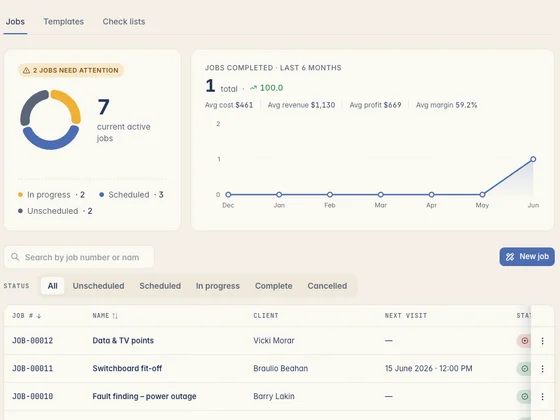
The Kelpie jobs screen — jobs needing attention, active jobs and the full job list
On site
12 Park St · 4 photos added
Job status
Ready to invoice
Signed off by Dave
What the crew reckons

Tradies who made the switch.

Real tradies, real businesses — running the whole job out of Kelpie.

Job details on scraps of paper

When the job lives in your head, things go wrong.

Details on a docket, photos lost in your phone, and a crew that can't see any of it. Here's what that's costing you.

01 The details are everywhere but one place

The address on a sticky note, the scope in a text, the gate code in your head. Half of it's lost by the time anyone's actually on site.

02 The photo you need is gone

Three thousand photos of the kids and the dog, and the one before-shot you need to back up a variation is buried somewhere in the middle.

03 The crew rings you all day

Every job, the same calls — what's the address, what are we doing, where's it up to. You're answering the phone instead of getting work done.

How job management works in Kelpie

One job card, from booked to signed off.

Everything about a job in one spot your whole crew can open on their phone — on site, where the work happens.

1 Step 01 · One job card

Everything about the job, in one spot.

The site address, the customer, the scope, the files — all on the one card. No more digging through texts and dockets to find what the job actually is.
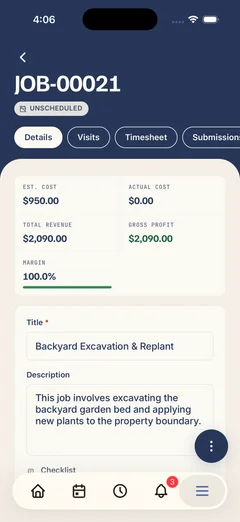
  • Site and customer details — address, contact and access notes, all in one tap.
  • Files and plans attached — drawings, spec sheets and documents live on the job.
  • The crew sees it on site — they open the job on their phone and get straight to work.
A Kelpie job on a phone — costs, margin, description and checklist for the job on site
2 Step 02 · Photos and notes

Snap it on site, it sticks to the job.

Take photos and add notes from your phone and they save against the job — not lost in your camera roll. Before-and-after shots that back you up later.
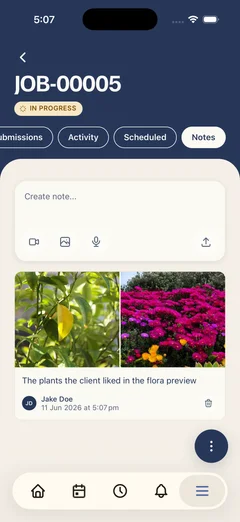
  • Photos saved to the job — not your personal camera roll, and there for good.
  • Notes from whoever's on site — the crew adds what they found and what they did.
  • Your record for variations — proof of what the site looked like and what got done.
A Kelpie job's notes on a phone — site photos and a typed note saved against the job, not lost in the camera roll
3 Step 03 · Track the status

See where every job's up to.

Every job has a status — booked, on site, done, ready to invoice — so a glance tells you what's happening and what's next, without ringing around.
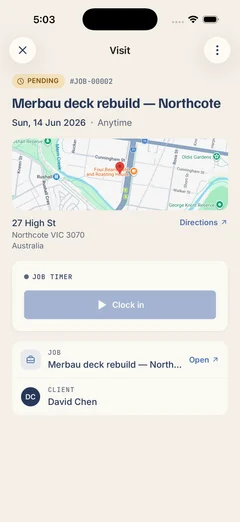
  • Status at a glance — know which jobs are moving and which need a push.
  • Checklists and sign-off — tick the job off properly so nothing's missed.
  • Full job history — a complete record of the work done for every customer.
A job visit on a phone — its status, site map and directions, a clock-in timer, and the linked job and client
Step 3 · Run the job

One job card carries the whole job.

The accepted quote becomes a job, the job carries the photos and notes, then it turns into an invoice in a tap — one app, enquiry to paid.

One app, from enquiry to paid

One subscription covers the quote, the job, the invoice and getting paid — no re-keying into a separate app, and your invoices sync straight to Xero.

Questions, answered

What tradies ask about job management.

Yes. The site address, customer details, scope, photos, notes and files all live on the one job card — so you're never hunting through texts and dockets to work out what the job is.
Yes. Whoever's assigned opens the job on their phone and gets the site, the customer and the scope — no ringing the office to ask where to go or what to do.
Yes. Snap photos and add notes from site and they save straight to the job — handy for before-and-after shots and backing up a variation later.
To the job. Your jobsite photos stay on the job card where you can find them, instead of getting lost among the personal photos on your phone.
Yes. Each job has a status — booked, on site, done, ready to invoice — so a glance across your jobs tells you what's moving and what needs chasing.
Yes. Your team adds what they found, what they did and photos of the work straight to the job, so you've got the full picture without being there.
Yes. You can open jobs and capture photos and notes even when reception drops out — it all syncs back up once you're in range again.
Yes. Drawings, spec sheets and any documents attach to the job, so the whole crew is working off the same plans on site.
Yes. Every job keeps its notes, photos and details, so you've got a complete record of the work you've done for each customer — useful for warranty, disputes and repeat work.
No. It's included with every Kelpie seat along with quoting, scheduling, invoicing and payments — nothing's locked behind a higher tier.
14 days free No card needed

Get every job out of your head and into one place.

Start your 14-day free trial today — no card, no lock-in, completely risk-free. So what are you waiting for?

No card needed 14 days free Cancel anytime