Every job and every crew member, on one board.

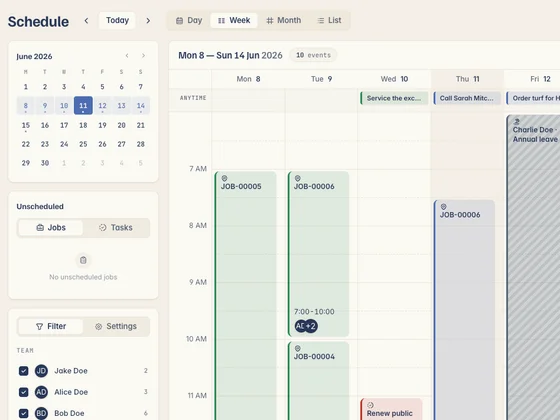
Drag jobs onto the calendar, assign the right person, and see the whole week at a glance — no double-bookings, no blokes turning up to the wrong site. Your crew sees their day the moment you book it.
No card needed 14 days free Whole crew included
app.kelpiehq.com/schedule
Kelpie's week schedule — every job and crew member on one board
Job assigned
Dave · Tue 8:00am, Glenroy
This week
23 jobs booked
No clashes · 4 crew
What the crew reckons

Tradies who made the switch.

Real tradies, real businesses — running the whole job out of Kelpie.

The diary that lives in your head

A scrappy schedule costs you a day a week.

When the calendar's a notebook, a whiteboard and a few text threads, things slip. Here's what that's really costing you.

01 Jobs booked in three different places

A notebook in the ute, the wall calendar at home, and a string of texts. Something always slips — a double-booking, a no-show, or a customer left waiting on the porch.

02 Two jobs, same time slot

Without a clear view of who's free, you book a second job into a slot that's already taken — then spend the morning ringing around to un-tangle it.

03 The crew turns up to the wrong site

You move a job to Thursday and forget to tell the boys. Someone drives clear across town to a site that's no longer on, and the day's gone backwards.

How scheduling works in Kelpie

Book it, assign it, and the crew just knows.

One shared board for every job and every person — built to be sorted in a couple of taps.

1 Step 01 · Drag and drop

Book a job in a couple of taps.

Drop a job onto a day and a person and it's scheduled. Need to move it? Drag it to a new slot — done, no rubbing out and rewriting.
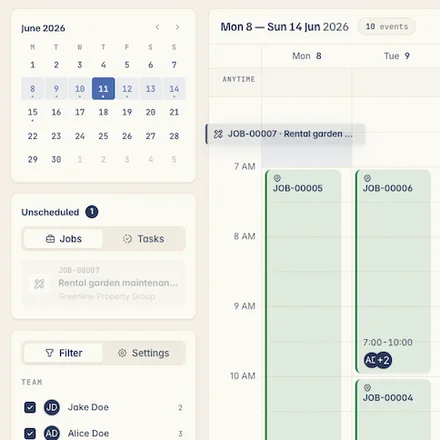
  • Drag-and-drop calendar — schedule and reschedule by dragging, not retyping.
  • Assign the right person — put the job on the crew member, or a subbie, who's free.
  • Recurring jobs sorted — set repeat work once and it fills the calendar itself.
Dragging an unscheduled job onto Kelpie's week calendar — booked onto a day and crew member in a couple of taps
2 Step 02 · See the whole week

Spot the gaps, dodge the clashes.

Switch between the day and the week to see who's on what at a glance — fill the quiet patches and make sure nothing's double-booked.
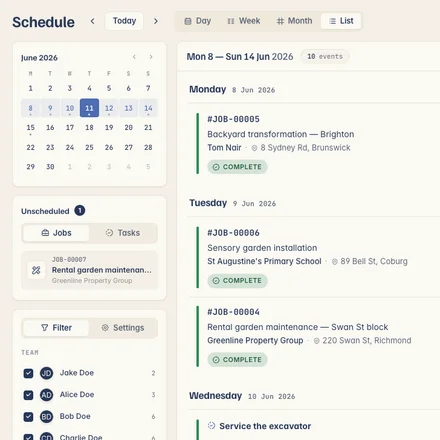
  • Day and week views — see the lot, or zoom into one crew member's run.
  • Colour-coded at a glance — sort by job, status or who it's assigned to.
  • No double-bookings — see who's already booked before you slot the next job in.
Kelpie's schedule in list view — the week's jobs grouped by day with crew, status and address, alongside the mini-calendar and unscheduled jobs
3 Step 03 · Crew on their phone

Your team sees their day instantly.

The moment you book or move a job, it shows up on your crew's phone — with the site address and the details, so nobody's ringing to ask where to go.
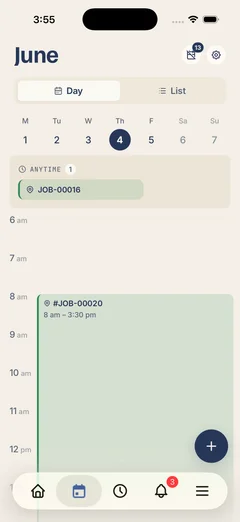
  • Pushed to their phone — new and changed jobs land on the crew's app straight away.
  • Address and details attached — they tap the job and get the site, the customer and the scope.
  • Everyone on the same plan — change it once and the whole crew's looking at the latest version.
Kelpie's schedule on a phone — the day's jobs and times in day and list views
Step 3 · Get it booked in

An accepted quote drops straight onto the calendar.

Once a quote's accepted it lands in the schedule ready to dispatch — then it's done, invoiced and paid, all in the one app with no re-keying.

One app, from enquiry to paid

One subscription covers the quote, the job, the invoice and getting paid — no re-keying into a separate app, and your invoices sync straight to Xero.

Questions, answered

What tradies ask about scheduling.

Yes. Drag a job to a new day or a different crew member and it's rescheduled — everyone assigned sees the change on their phone straight away.
Yes. The moment you book or move a job, it shows up on the assigned crew member's phone with the address and details, so nobody turns up to the wrong site.
Yes. Each person sees their own run for the day on the app — what's on, where it is and what the job involves — without ringing the office.
Yes. Put a whole crew on a big job, or hand one to a subbie — everyone assigned gets the job details on their phone.
Yes. Set up repeat work — weekly, monthly, whatever the customer's on — once, and it fills the calendar automatically so you don't re-book it each time.
Yes. Book multi-day jobs so a longer install or build sits across the calendar properly, instead of being crammed into a single slot.
The board shows who's already on a job before you schedule the next one, so you can see who's free and slot work in without clashes.
Yes. The full app runs on both, so your whole crew sees the schedule no matter what phone they're carrying.
No. Scheduling is included with every Kelpie seat along with quoting, jobs, invoicing and payments — nothing's locked behind a higher tier.
Never. Pay monthly or annually, cancel any time, and take your data with you. We'd rather earn your subscription each month than lock you in.
14 days free No card needed

Get your whole week sorted in one board.

Start your 14-day free trial today — no card, no lock-in, completely risk-free. So what are you waiting for?

No card needed 14 days free Cancel anytime