Quote the job before you've packed up the ladder.

Most jobs go to whoever quotes first. Build a sharp, branded quote on your phone and have them accept it before you leave site — no laptop, no Word template, no Friday-night paperwork.
No card needed 14 days free Quote in under 5 minutes
app.kelpiehq.com/quotes/QU-1042
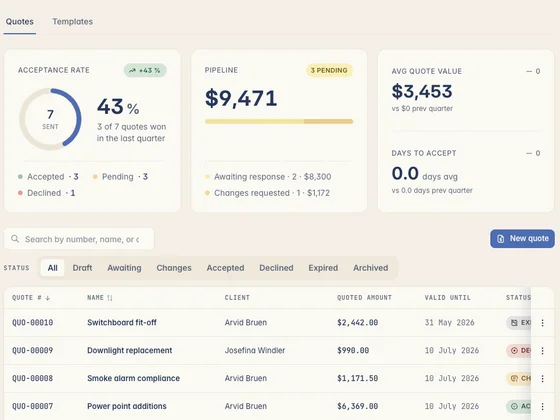
Kelpie's quotes screen — acceptance rate, pipeline value and every quote's status
Quote accepted
$2,970.00
Sarah T. · 9 min after sending
Booked as a job
One tap from accepted
What the crew reckons

Tradies who made the switch.

Real tradies, real businesses — running the whole job out of Kelpie.

The slow quote loses the job

The job goes to whoever quotes first.

Most jobs are won or lost in the day after you measure up. Here's what a slow, scrappy quoting process is quietly costing you.

01 The quote that never went out

You measured up Tuesday and promised a price by Friday. It's now next Wednesday, the paperwork's still in the ute, and the customer's already rung someone else.

02 Guesswork on the back of a docket

Pricing from memory and a calculator means you either scare the customer off with a number that's too high, or cut your own margin to the bone to be safe.

03 A text message with a number

A figure fired off in an SMS doesn't win the bigger jobs. It looks like every other bloke who quoted — and gives the customer nothing to say yes to.

How quoting works in Kelpie

From measure-up to accepted, on the spot.

Three steps, all from your phone, all before you've left site.

1 Step 01 · On site

Quote on the spot, straight from your phone.

Pull up your price book, drop in line items with photos, and hand over a real quote before you've packed up the ladder.
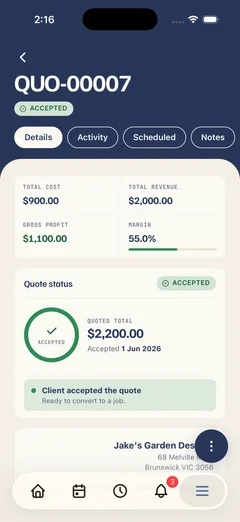
  • Your price book built in — tap in your saved rates instead of pricing from memory.
  • Photos on every line — show them exactly what needs doing and why.
  • Your margin, live as you build — cost and profit on every quote, so you never shave it just to feel safe.
A Kelpie quote on a phone — totals, status and a one-tap accept, built and sent from site
2 Step 02 · Looks the part

A quote that looks like you mean business.

Your logo, your ABN, GST broken out clearly — a branded quote that wins the bigger jobs instead of looking like a number off the back of a docket.
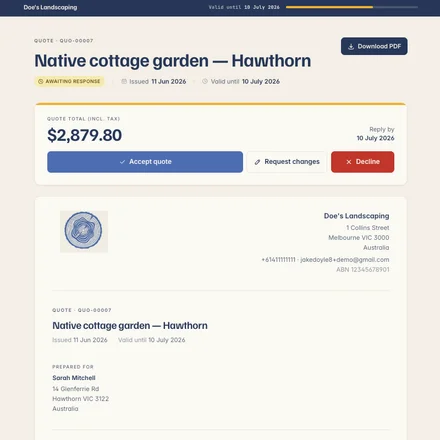
  • Your branding and ABN on every quote, automatically.
  • GST shown line by line — compliant, no maths, no surprises.
  • Every line itemised — they see exactly what they're paying for, not a lump sum to argue over.
The branded quote a customer sees — itemised with GST, accepted in one tap
3 Step 03 · Accepted

Accepted from their phone, booked in a tap.

Chasing a signed quote used to mean printing, posting and waiting a week. Now it's a link they open and accept from their phone — done in minutes, not days.
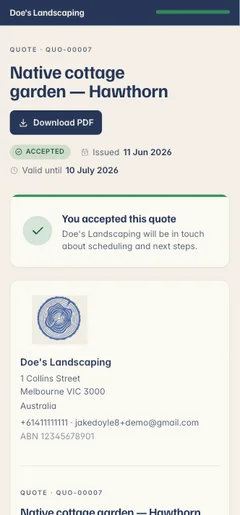
  • Accepted online, no paperwork — they open the emailed link and accept from their phone, no printing or posting.
  • Kelpie chases it for you — automatic email reminders nudge customers who haven't replied, so quotes don't go cold.
  • One button to a job or invoice — once it's accepted, no re-keying into anything else.
A Kelpie quote accepted on the customer's phone — branded, with a downloadable PDF and a one-tap accept
Step 2 · Quote the job

One accepted quote runs the whole job.

The moment a quote's accepted it turns into a job, then an invoice, then a payment — one app, no double entry, synced to Xero.

One app, from enquiry to paid

One subscription covers the quote, the job, the invoice and getting paid — no re-keying into a separate app, and your invoices sync straight to Xero.

Questions, answered

What tradies ask about quoting.

Yes — build the whole quote on site from your price book and send it as a link before you've packed up. No laptop, no trip back to the office.
Your price book stores your rates and common line items, so a quote is a few taps rather than a fresh document each time. Update a price once and it's right everywhere.
Yes. Save the jobs you quote again and again as templates — line items and pricing ready to go — so a repeat quote is a few taps, not a rebuild from scratch.
Yes. Every quote shows its cost, profit and margin as you build it — so you know exactly what you're making before you send it, and never quote yourself short just to win the job.
Every quote shows GST line by line with your ABN and branding on it. No separate template, no manual maths — it's compliant the second you send it.
No app and no login. You email them a link, they accept it from their phone, and can download a PDF for their records — nothing to print, sign or post. Haven't heard back? Kelpie sends automatic email reminders so the quote doesn't go cold.
Yes — you'll see when a quote's been opened, and you're notified the moment it's accepted, so you know when to follow up or book the job in. Some apps charge extra for that; with Kelpie it's included on every seat.
With one button it becomes a job or an invoice — no re-keying. The invoice carries its GST and your ABN and syncs to Xero, so the number you quoted is the number that lands in your books.
Yes. Your whole crew quotes off the same price book and templates, so every quote goes out priced consistently — no one guessing the numbers.
Never. Pay monthly or annually, cancel any time, and take your data with you. We'd rather earn your subscription each month than lock you into a contract.
14 days free No card needed

Win the next job with a better quote.

Start your 14-day free trial today — no card, no lock-in, completely risk-free. So what are you waiting for?

No card needed 14 days free Cancel anytime