Your whole crew on the same page — seamlessly coordinated.

Add your team in minutes, put the right people on the right jobs, and they all work off the same job info. Every seat gets every feature — no cut-down plans, no locked-away tools.
No card needed 14 days free Every seat, every feature
app.kelpiehq.com/team
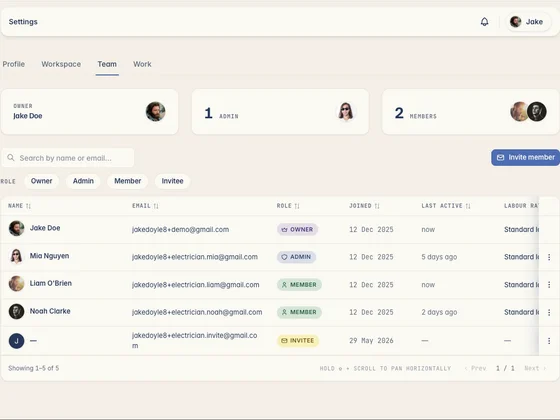
Kelpie's team screen — owner, admins and crew with roles and last activity
Crew added
5 on the tools · 1 in the office
Timesheets
38.5 hrs
Clocked on site this week
What the crew reckons

Tradies who made the switch.

Real tradies, real businesses — running the whole job out of Kelpie.

When everything goes through the boss

A crew working off old info is a crew doing rework.

When the team can't see the job and every detail runs through you, work slows down and mistakes creep in. Here's the real cost.

01 The boss is the bottleneck

Every detail goes through you. The crew can't see the job, so they ring you for it — and nothing moves until you pick up the phone.

02 Everyone on a different version

You changed the job this morning, but the bloke on site is working off yesterday's job sheet. Work gets done twice, or done wrong.

03 Timesheets done by memory

Hours scribbled on paper, start times guessed at, and payday becomes a Sunday-night puzzle — with no idea what labour cost you on each job.

How team management works in Kelpie

The whole crew, working off one system.

Add your people, hand out the jobs, and let everyone run their day from the one system — office or on site.

1 Step 01 · Add the crew

Your whole crew, set up in minutes.

Invite the crew by email and they're in within minutes — and every seat gets the full app, so nobody's stuck on a cut-down plan.
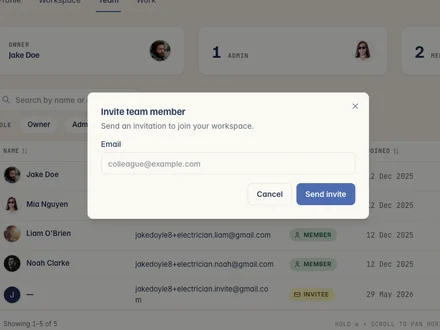
  • Invite in minutes — add anyone by email and they're set up before smoko's over.
  • Profiles and rates — each member carries their licences and their own labour rate.
  • Simple per-seat pricing — one price per person with everything included, easy to add or drop.
Inviting a team member to a Kelpie workspace by email
2 Step 02 · Hours on the clock

Timesheets without the paperwork.

The crew clocks on and off jobs from their phones, and the hours land in timesheets ready to approve — no scraps of paper, no guesswork.
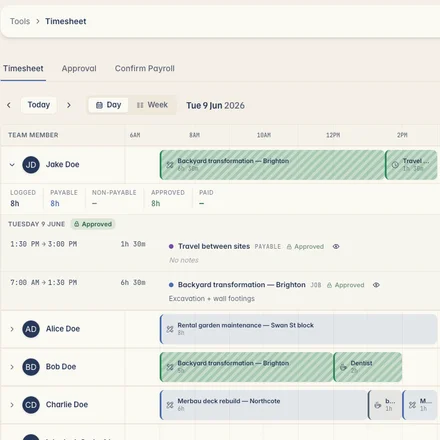
  • Clock on from site — start and stop the clock on the job, straight from the phone.
  • Approve come payday — check the week's hours, approve them and mark them paid.
  • Know your labour cost — hours are costed at each member's rate, job by job.
Kelpie timesheets — the crew's logged, approved and paid hours for the day
3 Step 03 · One source of truth

Everyone works off the same info.

Assign jobs to the right person, see where each one's up to, and push a change once — the whole crew's looking at the latest version.
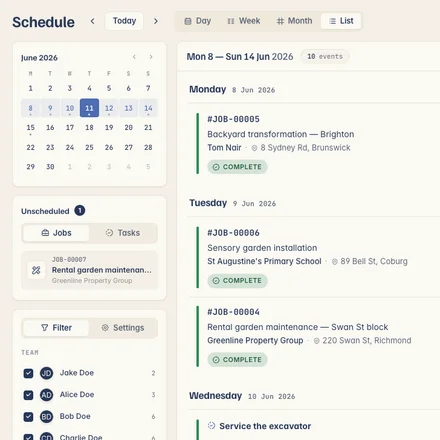
  • Assign to the right person — hand jobs out and their phone pings with the details.
  • See where each job's up to — know what's moving without ringing around.
  • Change it once — update a job and everyone's on the latest, no old job sheets.
Kelpie's schedule in list view — the week's jobs grouped by day with crew, status and address, alongside the mini-calendar and unscheduled jobs
Built for the whole crew

Everyone runs the same job, from enquiry to paid.

Office or on the tools, your whole team works the one system — so jobs move from quote to payment without every detail going through you.

One app, from enquiry to paid

One subscription covers the quote, the job, the invoice and getting paid — no re-keying into a separate app, and your invoices sync straight to Xero.

Questions, answered

What tradies ask about managing a team.

Invite them by email and they're set up in minutes. New to Kelpie? They sign up from the invite and land straight in your workspace, ready to be put on a job.
Kelpie is priced per user, and every seat gets every feature — no cut-down plans or locked-away tools. You pay for the people on your crew, not for how many jobs you win, and you can add or drop a seat any month as the team changes.
Yes — everyone gets their own seat and login, so jobs, hours and changes are tied to the right person. And when someone moves on, you just deactivate their seat.
Yes. Each team member has their own labour rate, and the hours they clock are costed at that rate — so you can see what the labour actually cost you on a job.
Yes. The crew runs their day from the mobile app — checking their schedule and job details, clocking on and off, ticking off tasks — while the office works off the same system on the web.
Assign a job to the right person and it lands on their phone with the details. Change who's on it and the update follows automatically.
Deactivate a staff member and their access is revoked straight away — handy when someone moves on, so old logins don't linger around your jobs and clients.
Yes. Staff clock on and off jobs from their phone, the hours land in timesheets for you to approve, and you mark them off once they're paid.
Yes. Change a job once and the whole crew sees the latest version — no one's left working off an out-of-date job sheet.
Never. Pay monthly or annually, cancel any time, and take your data with you. We'd rather earn your subscription each month than lock you in.
14 days free No card needed

Get your whole crew on the same page.

Start your 14-day free trial today — no card, no lock-in, completely risk-free. So what are you waiting for?

No card needed 14 days free Cancel anytime